Is the full potential of your home security system locked behind a confusing app interface? If you’re struggling with setup, unsure what features you can actually use, or simply frustrated by unreliable notifications, you are not alone. Your Pyronix alarm is a powerful tool for protecting your property, but to truly harness its capabilities, you need to master the pyronix homecontrol app. This application is designed to provide complete control and peace of mind, putting advanced security right at your fingertips.
Consider this your definitive guide for 2026. We are here to provide the expert assistance you need to move from uncertainty to total confidence. In this comprehensive walkthrough, we will demystify the entire setup process, explore every key feature, and provide straightforward, professional solutions to common troubleshooting problems. By the end, you will have the knowledge to manage your system effortlessly, ensuring your property is safe and secure whether you are at home or away.
What is the Pyronix HomeControl App? (And Which Version Do You Need?)
Imagine your home’s security system in the palm of your hand. That is the power and peace of mind delivered by the Pyronix HomeControl app. In essence, it is the smart remote control for your Pyronix alarm, giving you the ability to arm, disarm, and monitor your property from anywhere in the world with an internet connection. This simple yet powerful tool puts you in complete control, offering unparalleled convenience and instant awareness of your home’s security status.
The core benefits are clear and immediate:
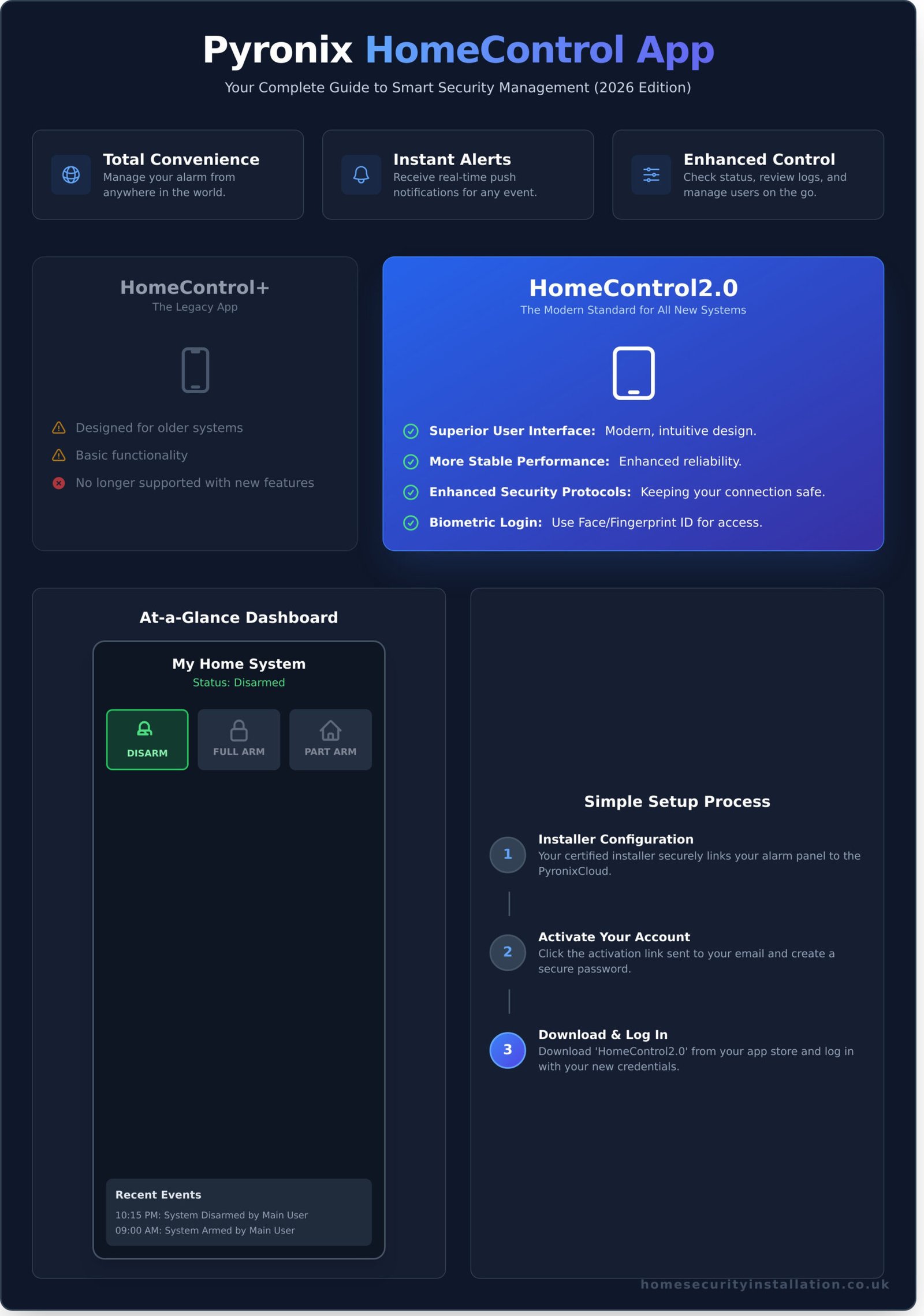
- Total Convenience: Manage your alarm system remotely, without needing to be at the physical keypad.
- Instant Alerts: Receive real-time push notifications directly to your smartphone for any system event.
- Enhanced Control: Check system status, review event logs, and manage user settings on the go.
HomeControl+ vs. HomeControl2.0: The Key Differences
It is crucial to know which version of the app corresponds to your system. HomeControl2.0 is the modern, current standard for all new Pyronix installations. It features a vastly superior user interface, more stable performance, and enhanced security protocols, including biometric login (fingerprint or face ID). In contrast, HomeControl+ is the legacy app designed for older systems. If you are having a new system installed in 2026, it will be configured to work exclusively with the more advanced and reliable HomeControl2.0.
Why a Smart Alarm App is Essential for Modern Security
A smart app transforms a traditional security alarm system from a reactive device into a proactive security partner. The modern homeowner in the UK expects a level of control that only an app can provide. Forgot to set the alarm before leaving for work? You can arm it from your desk. Expecting a delivery or a trusted tradesperson? Disarm the system remotely to grant access and re-arm it once they’ve left. When you’re on holiday, you can instantly check that your home is secure, providing invaluable reassurance. These instant push notifications for any activation mean you are the first to know, allowing for a swift and effective response.
Getting Started: A Step-by-Step Guide to Setting Up HomeControl2.0
Connecting your smartphone to your Pyronix security system is a straightforward process designed to give you complete control and peace of mind. Before you begin, ensure you have two prerequisites: a compatible, professionally installed Pyronix alarm panel and a stable internet connection for the panel to communicate with the cloud. The initial, technical part of the setup is always completed by your certified security installer. They establish the secure link between your alarm panel and the PyronixCloud, a critical step that ensures reliability. This professional configuration is a key factor when choosing a home security system, as it guarantees everything is set up correctly from day one. Your role is to simply download the app and activate your user account.
Downloading and Installing the App
The first step is to get the correct application on your smartphone or tablet. Head to the Apple App Store (for iOS devices) or the Google Play Store (for Android devices) and search for ‘HomeControl2.0’. It is vital to download this version, as the older ‘HomeControl+’ app is no longer supported with the latest features. Once you find it, simply tap ‘Get’ or ‘Install’ and let the app download to your device.
Connecting the App to Your Alarm System
Once your installer has linked your alarm panel to the PyronixCloud, they will send you an invitation via email. This email contains a secure link to create your personal user account. Follow these simple steps:
- Open the invitation email and click the activation link.
- You will be prompted to create a secure password for your account. We recommend a strong password combining letters, numbers, and symbols.
- Once confirmed, open the pyronix homecontrol app on your device and log in using your email address and the new password you just created.
First Look: Navigating the Main Dashboard
Upon logging in for the first time, you will see the main dashboard. This screen provides an at-a-glance overview of your security system’s status. The large icons at the top are your primary controls:
- Green unlocked padlock: Your system is currently disarmed.
- Red locked padlock: Your system is fully armed.
- Yellow icon with a house/moon: Your system is in a part-armed state (e.g., securing downstairs at night).
Below these controls, you can view the system status and a log of recent events, giving you immediate confirmation of all activity.
Mastering the Core Features for Everyday Peace of Mind
The true power of the Pyronix HomeControl app lies in its ability to place complete control of your security system directly into your hands, wherever you are. These core functions are designed for daily use, transforming your alarm from a simple deterrent into an interactive part of your home management. By mastering them, you gain unparalleled convenience and the confidence that comes with total awareness.
Remote Arming and Disarming
Gone are the days of rushing back home because you forgot to set the alarm. With the app, you can manage your system’s status with a single tap, providing flexibility for modern life. The two primary modes are:
- Full Arm: This secures your entire property, activating all sensors. It’s the standard mode for when everyone is out of the house.
- Part Arm: Often used as a ‘night mode’, this secures the perimeter (doors and windows) while leaving interior motion sensors off, allowing you to move freely and safely inside.
Imagine settling into bed and arming the system without getting up, or disarming it remotely to allow a trusted courier to leave a parcel in your porch. After sending a command, the app provides instant visual confirmation, so you are always certain of your system’s status.
Understanding Push Notifications and Alerts
Your security system should communicate with you. The Pyronix HomeControl app acts as your personal security watch, sending instant push notifications to your smartphone for any critical event. This proactive communication means you are always the first to know, allowing you to take swift, decisive action. Key alerts include:
- Intrusion Alerts: Immediate notification if a sensor is triggered while the system is armed.
- System Faults: Alerts for issues like low sensor batteries, ensuring your system is always operating at peak performance.
- Power Events: Notification if your property loses mains power, giving you a crucial heads-up.
A complete history of all notifications is stored securely within the app for your review at any time.
Checking System Status and Event Logs
For complete transparency, the app provides a detailed overview of your entire system. You can check the status of individual zones at a glance—perfect for confirming if a window was left open before arming. The comprehensive event log is an invaluable tool for tracking activity, providing a timestamped record of every action. It details exactly who armed or disarmed the system and when, making it ideal for monitoring when children arrive home from school or for keeping a secure record in a small business environment.
Advanced Capabilities: Integrating CCTV and Smart Home Devices
The true power of the pyronix homecontrol app is revealed when you look beyond basic arming and disarming. It serves as the central command for a fully integrated security ecosystem, combining your alarm with CCTV and smart home devices. By uniting these elements, you create a more powerful, responsive, and convenient system that delivers complete peace of mind and puts you in total control.
Adding Pyronix Cameras for Visual Verification
Integrating compatible Pyronix cameras transforms your security from a simple alert system into an intelligent verification tool. Directly within the app, you can view live HD footage from anywhere, at any time. If your alarm is triggered, you can immediately check the live feed to assess the situation, providing crucial information and preventing false alarms. You can also review recorded clips on demand, giving you a complete visual record of events at your property.
Controlling Your Home with SmartPlugs
Extend your control beyond security with Pyronix SmartPlugs. These clever devices allow you to manage appliances directly from the app, adding a layer of smart automation to your home. For example, you can program a lamp in the living room to turn on when the system is disarmed, welcoming you home safely. Or, you can remotely activate appliances to create the impression that someone is home, providing an effective deterrent to potential intruders.
Using Biometrics for Secure and Fast Login
For quicker, more secure access to your system, we strongly recommend enabling biometric login. Using your device’s built-in Face ID or Fingerprint scanner means you don’t have to remember and type a password every time. This adds a robust layer of security while making daily use of the pyronix homecontrol app effortless.
- How to enable: Go to ‘Settings’ within the app.
- Select ‘Biometric Authentication’ (or a similar option).
- Follow the on-screen prompts to authorise the app with your device’s biometrics.
These advanced features elevate your Pyronix system from a standard alarm into a comprehensive home management and security solution. By integrating cameras and smart devices, you gain unparalleled control and awareness, ensuring your property is always protected. Want to add these powerful capabilities to your system? Talk to our installation experts. Our certified professionals can help you design and install a fully integrated solution tailored to your needs.
Common Problems & Troubleshooting Your Pyronix App
Even the most reliable security systems can encounter occasional issues. To ensure your complete peace of mind, we’ve compiled this quick-reference guide to address the most common problems users face with the Pyronix HomeControl app. Before contacting your installer, please run through these simple checks.
Problem: Push Notifications Are Not Working
Instant notifications are a core feature for your security. If they suddenly stop, it’s often a simple settings issue on your smartphone rather than a fault with the alarm itself. Before making a call, please work through this checklist:
- Verify App Permissions: Go to your phone’s main settings, find the Pyronix HomeControl app, and ensure that notifications are enabled. Modern phones often have multiple levels of notification settings, so check them all.
- Check Your Connection: A stable internet connection (Wi-Fi or mobile data) is essential for receiving push notifications. Try browsing a website to confirm your connection is active.
- Restart Everything: The classic solution often works. Fully close the app and restart it. If that doesn’t help, restart your phone completely.
If you have completed these steps and notifications are still not coming through, it is time to contact your professional installer for further diagnostics.
Problem: App Shows ‘Offline’ or Fails to Connect
An ‘Offline’ status indicates the app cannot communicate with your alarm panel. This almost always points to a connectivity issue at your property. First, check if your home broadband is working by connecting another device to your Wi-Fi.
If your internet is working, you can try restarting your broadband router. If you feel confident doing so, you can also power down and restart your main alarm panel as per your installer’s instructions. However, an ‘Offline’ status can indicate a fault with the panel’s communication module, which requires expert attention. For this issue, we strongly advise you to contact your security installer, as they will need to diagnose the hardware.
What to Do If You Forget Your App Password
Forgetting a password is a common occurrence. Your security installer does not have access to your app login details for your own protection. Instead, you can easily reset it yourself.
Simply open the app’s login screen and tap the ‘Forgot Password?’ link. You will be prompted to enter the email address associated with your account. Pyronix will then send a secure link to that email, allowing you to create a new password and regain access. Ensure you check your junk or spam folder if the email doesn’t arrive promptly.
Unlock Complete Control and Peace of Mind
You are now equipped with the essential knowledge to transform your smartphone into a powerful command centre for your home security. We’ve walked through everything from the initial setup and mastering daily features to leveraging advanced CCTV and smart home integrations. This comprehensive understanding ensures you can confidently manage your property, giving you the control and reassurance you deserve from the pyronix homecontrol app.
However, the app’s powerful capabilities are only as reliable as the system they control. For true, unwavering peace of mind, a professional installation is non-negotiable. As certified Pyronix installers with a legacy of providing trusted security solutions since 1980, our expertise is your greatest asset. We ensure every sensor, camera, and connection is flawlessly configured for optimal performance, serving homeowners throughout Hertfordshire, Buckinghamshire, and NW London.
Frequently Asked Questions About the Pyronix HomeControl App
Is the Pyronix HomeControl app free to use?
The app itself is free to download from the Apple App Store and Google Play Store. However, to connect the app to your alarm system, access to the PyronixCloud service is required. This service typically involves a small annual subscription fee, managed by your security installer, which covers server maintenance and secure push notifications. This ensures a reliable and secure connection for your complete peace of mind, allowing you to control your system from anywhere.
How secure is the connection between the app and my alarm system?
Pyronix places the highest priority on your security. The connection between the HomeControl app and your alarm panel is protected with advanced 128-bit encryption protocols. This is a highly secure standard that ensures all data transmitted is kept private and safe from unauthorised access. You can confidently manage your system remotely, knowing that your connection is robustly protected by industry-leading security measures, safeguarding both your data and your property.
Can I use the HomeControl app to manage multiple properties?
Yes, the HomeControl app is expertly designed for users who need to manage security for more than one location. You can add multiple Pyronix alarm systems to a single app account, making it ideal for overseeing your home, a holiday property, or your business premises. The app allows you to seamlessly switch between sites, giving you the power to arm, disarm, and check the status of each system independently from one convenient interface.
What happens if my home internet connection goes down?
Your property remains protected. Your Pyronix alarm system is designed to function as a standalone unit and does not rely on the internet to detect an intruder and activate its sirens. While your internet is down, you will not be able to receive push notifications or control the system remotely via the app. For maximum resilience, we recommend a system with a dual-path communicator (IP and GPRS/4G) to maintain a constant connection.
Which Pyronix alarm panels are compatible with the HomeControl2.0 app?
The modern Pyronix HomeControl app is designed to work with our latest generation of security panels. Compatibility is assured with the Enforcer V10, Enforcer V11, and PCX 46 control panels, provided they are equipped with a Pyronix IP communication module and connected to the PyronixCloud by a certified installer. If you have an older system, please consult a security professional about upgrading to a compatible panel to enjoy advanced remote control features.
Can I add other family members to use the app?
Absolutely. You can easily grant access to trusted family members or keyholders, allowing them to control the security system from their own smartphones. As the main administrator of the system, you retain full control over user permissions, deciding who can arm or disarm the system. This feature provides excellent flexibility and convenience, ensuring that everyone who needs access can help keep your property safe and secure.
Does the app allow me to bypass a faulty zone remotely?
For critical security reasons, the ability to bypass or omit a zone is a function restricted to your professional security installer. This is a deliberate safety measure to prevent zones from being accidentally or incorrectly disabled, which could leave your property vulnerable. If a detector is faulty, you should contact your installer to inspect the system and perform any necessary maintenance, ensuring your protection is never compromised.